
Before you get mad at me for the lazy reference, please know I’ve been called lazy too. Lazy people try to find systems so they don’t have to do mundane stuff. This article is a remake of one I did over a decade ago about predictability and passwords. However, the password strategy I outlined years ago is outdated. Now, you should use a dedicated password manager.
Years ago, I suggested having a system and testing the strength against some password meters. It worked, but it was a bit labor-intensive. Fast forward, and we now have password managers that simplify things. And if you’re not using one, you’re at risk and are doing more work than necessary.
Why Use a Password Manager?
Some folks may be happy with their existing systems that rely on their memory or maintain a password list on their computer. That used to work when we needed to track a few passwords and only on computers. Sadly, some people think they are safe because they delete their web browser history. Sorry, there is no correlation.
These days, just about everything needs a password, and it’s not just online. We’ve got PINs, license numbers, gym locker combos, library card numbers, router passwords, passphrases, and other stuff. I suspect if you wrote them all down, you’d have several hundred. I do.
Chances are we’ve all experienced that moment where we’ve entered multiple bad passwords and know that if we don’t get this next attempt correct, we’ll lock ourselves out. Worse, you then have to call support and remember the answer to the secret question you forgot about. “Really…that was my favorite film?” And these lockouts occur when you really need something or technical support is closed.
Password Manager Benefits
- They are more secure and use encryption.
- They can handle multiple data types (passwords, combinations, license numbers, notes, etc)
- You can be used across devices or platforms (web browser, desktop, phone, tablets).
- The cost is minimal or free.
- They can automatically fill in passwords or address fields on websites.
- They can automatically create strong passwords for you.
- They keep all your info in one convenient place.
- They can scan your existing passwords for duplicates or ones you haven’t changed.
- You can scan to see if any of your email addresses are in use on compromised domains.
- You can use it offline.
- You can secure it with a Master password.
- They can email you when a password has changed.
- You can use multi-factor authentication (2FA).
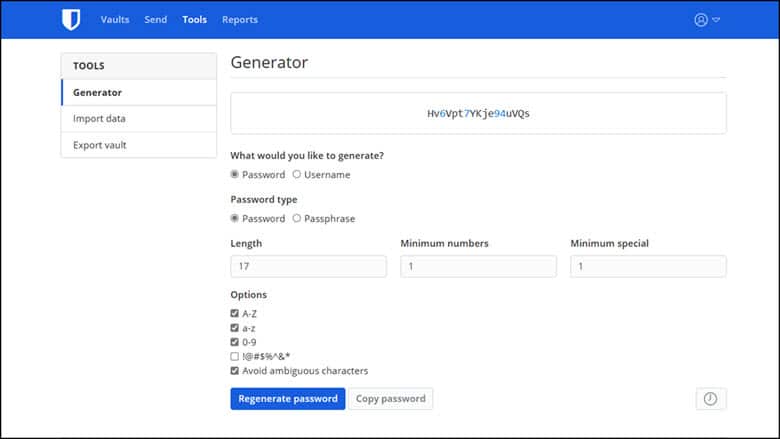
Now, can your system do that? Probably not. These password systems are designed for securing and capturing sensitive info. Below is an example of one that works with my web browser. You can see it provides me with several options for generating usernames, passwords, or passphrases. Many of these services also have apps that work with your smartphone.
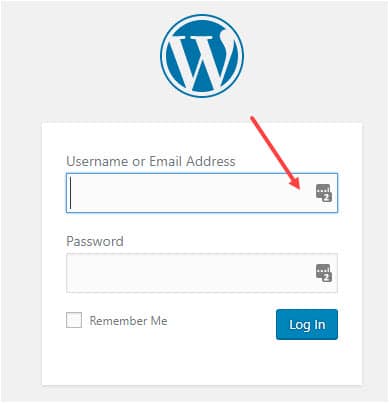
Once you’ve entered a password, many systems display a small icon in the username and password fields indicating they have entries for this particular site. For example, my password manager indicates it has two accounts for this domain in the screen snap below. I can click the tiny icon and have the info filled in. Sometimes, you need to click in the field or glance at the browser extension icon and look for a badge counter.
Importing and Exporting Password Files
After the recent debacle with LastPass, I decided to find a new solution. Everyone has their own criteria. However, one item everyone should consider is data portability. The last thing you want to do is spend countless hours re-entering data from one system to another. It’s time-consuming and prone to errors.
Most good systems have both import and export capabilities. In the example below, you can see that Bitwarden has numerous options. These include many of the popular programs and native browsers that capture passwords.
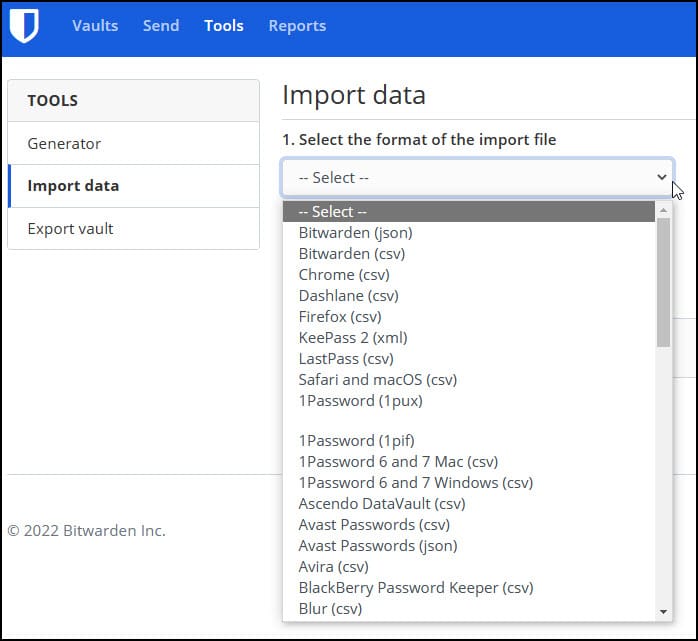
What is missing from the above list is just “plain vanilla” CSV or TXT files. People who store their passwords in Microsoft Excel, Word, Evernote, and so on might use this. The problem is that your file most likely has field names different than your password manager expects. For example, on your Excel sheet, you might have a column labeled “secret key”, that is unknown to your new program.
There is a solution if you fall into one of these outlier cases. The workaround is to manually enter a handful of entries into your new password manager.
- Make a copy of your current password file (e.g. Microsoft Excel file, Notepad file).
- Open both your new password manager and old password file. (e.g. Bitwarden and Microsoft Excel)
- Copy a handful of entries from the old system to your new one.
- Try to use all the fields in the new program that mimic your existing system. Look for extra fields or columns where you’ve used notes, categories or custom fields.
- Export the file from your new password manager as either a CSV or TXT file. This depends on your existing system.
- Open the exported file from your new system and compare the headers and order to your existing system.
- Rename and reorder the fields to match your new password manager. You may need to combine fields from your old system.
- Delete the items you entered in Step 3 from your new system. You don’t want duplicates.
- Import your file from Step 7 into your new password manager.
- Carefully review your entries.
- When you like the results, delete your test export file, original file, and copy.
Verifying the new file based on size may take a bit of time. However, you should make it a priority to securely delete the old files.