
There’s little question that a big drain on productivity is fear. Many of us tend to worry about things that are out of our control. One item that people worry about is browser cookies. Browser cookies are neither good nor bad. If you were to remove all cookies, you’d probably find your internet experiences to be less enjoyable. In this tutorial, I’ll explain some cookie basics and their structure.
What is a Browser Cookie?
A browser cookie is a small text file that a web server sends to your web browser when you request a page from a site. This text file is no larger than 4k and stores specific data elements. There is no programming code in these files. You can see a site’s cookies from within most browsers. For example, clicking the lock icon on Microsoft Edge browsers shows 19 cookies in use for the page I’m viewing. There is nothing magical about that number, and it can vary between users.

Understanding HTTP Cookie Structure
If you were to open these cookies, you could see there is a structure that cookies share. Each cookie has values for seven fields:
- Name
- Content or Value
- Domain
- Path (the “/” means the cookie is valid anywhere on that domain.)
- Send for (the connection security level)
- Created
- Expires
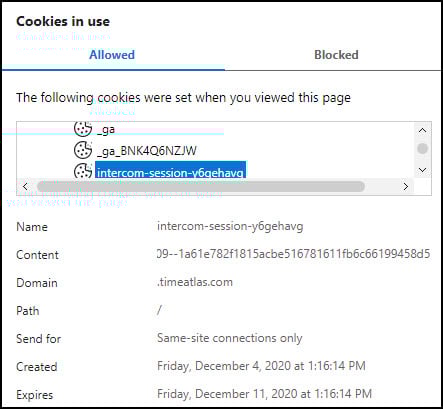
The picture above is for an Intercom chat cookie on this site. However, if you were to do this exercise, you would not see this cookie. It’s set because I am logged into WordPress, and my hosting provider uses Intercom for support issues.
How Do I Get Web Cookies?
One question people often ask is how they even got these cookies. This is all handled on the backend between your web browser and the server of the website you’re visiting. When you request a page from a site such as ours, the web server looks for cookies from our domain .timeatlas.com on your computer. In the screen print above, you can see a field where the domain name is captured.
Our web server only reads cookies that match .timeatlas.com. This means our server couldn’t read your New York Times cookies, and the New York Times servers couldn’t read the .timeatlas.com cookies.
If the webserver finds its domain cookies, it will use them. If it doesn’t find any cookies, it will create them. Your web browser can control this as you may prevent cookies. Some people also have software programs that manage cookies.
To give an example, if this was the first time you came to this site, you saw a cookie banner. Based on your selection, a cookie was set with your preference. When you return to the site, the browser looks for this cookie. If it finds that cookie, you don’t see the banner. But if you delete it, you will be greeted with the cookie banner again.
Different Browser Cookie Types
There are some important differences between cookies based on expiration and domain. A web server can issue two types of cookies based on time, called session cookies and persistent cookies.
Cookies that expire once you log off or close the browser are called session cookies. These all display “session” under the Expires column. Online shopping carts may use session cookies to track items in your basket. These cookies are stored in memory and not on your hard drive.
A persistent cookie is one, which has an expiration date. The web server issues the expiration date. In the example above, you can see our Intercom cookie is a persistent cookie that lasts a week. In some cases, persistent cookies are set for a very long time. These types of cookies can help track logged-in users.
Aside from expiration, there is another distinction based on domain. Again, looking at the screen snap, you can see that the Intercom cookie shows a domain of .www.timeatlas.com. If the domain name in the Domain field matches the issuing site’s domain name, it is known as a First Party cookie. These tend to be trusted cookies as you have a relationship to the site unless some spyware or adware has infected you.
If you were on our site and were served a cookie from XYZ.com, that would be considered a Third-Party cookie. You generally don’t have a relationship with this company. These types of cookies are often scrutinized as people want to know who is this other company.
In some cases, there is a relationship with the company. For example, if this site were part of a publishing company with many properties, the server might issue a third-party cookie in the parent company’s name, such as timeatlas.publishingcompany.com. Other examples might be cookies issued by a web analytics company on behalf of the site you’ve visited.
One type of third-party cookie that raises eyebrows belongs to ad networks. Some websites, such as ours, use the services of ad networks. These sites may set a third-party cookie that other member sites can read to deliver the ads. Some of these cookies may be used for behavioral retargeting.
If I were to take a poll, I suspect the results would probably be something like 1/3 of the readers hate them, 1/3 love them, and the last 1/3 want me to explain it. Basically, if you click one of these segmented ads, the company might consider you “interested” based on how they set up the ad campaign. If you’re interested, they want to show their product ad to you more often. Then based on your activity you might see similar product ads.
On the surface, this is a good and effective marketing strategy. The problem is companies don’t always close the feedback loop and stop showing the ad when you buy the product. Or, they don’t know how to set limits and you see the ads too often and the brand is tarnished as people feel stalked.
Why are Cookies Used?
While many people equate cookies to ad delivery or tracking, they can do more. Cookies are also used to:
- personalize a site
- authenticate you to a site requiring a username
- maintain shopping cart status
- set a default “dark theme”
- track affiliate leads
- analyze web traffic
This site sets cookies for personalization and analytics purposes. On my previous content management system (CMS), you could see a cookie named “fontSize.” This was an example of a cookie offering personalization based on the user wanting larger or smaller display font sizes. Some sites do something similar with a “dark theme” vs. “light theme.”
Another common use case appeared during the pandemic when more people worked from home. Companies had to figure out a way to make sure employees on their corporate website didn’t get tracked. One way to do this was to create a login page for employees that added a cookie.
The part that often scares people is web analysis. In our case, the bottom four cookies starting with an underscore are used for web analysis. Some people mistakenly think that cookies allow web admins or some people to track all your movements throughout the web. They believe the moment you leave my site, I alert Amazon and tell them you’re on your way to buy that book on Microsoft Excel. At the same time, Google tells me that you’re heading my way to read about an Excel tip.
Like most stories, there is some truth to the one above. I can tell if a reader was referred to this site by Google. But it’s not a cookie that tells me that info. That’s just part of the information written to web server logs. In recent years, Apple and Google have been limiting what webmasters and marketers can see.
Where Do I Find Browser Cookies
Your browser saves persistent cookies in a specific location. This is why some sites look different in different browsers. You may have set your personalization for a site using Firefox but not done the same customization using Google Chrome. Cookies are not shared across browsers. If you set your cookie preference using Firefox, the cookie will not carry over to Google Chrome. The same rule applies if you delete cookies too.
Now that we know what are browser cookies, let’s get some address bar commands that locate your cookies. And with any luck, Google won’t change these again.
Microsoft Edge
In your address bar, type :
edge://settings/siteDataGoogle Chrome
In your address bar, type:
chrome://settings/cookiesYou can see more info in our deleting Chrome cookies tutorial and how to delete Chrome browser history.
Mozilla Firefox
In your address bar, type:
about:preferences#privacyAnd then click Manage Data…
Internet Explorer
If you’re still using Internet Explorer, you will have a separate cookies folder containing all your items. However, you’ll need to change your folder options so you can see hidden system files. This folder is found at:
C:\Users\[User Name]\AppData\Roaming\Microsoft\WindowsOne item that scares people with Internet Explorer is the cookie name that includes your username. For example, the cookie for our site might show as jr@www.timeatlas.com. This user name, “jr.” does not get sent to a server. This is Microsoft’s way of separating multiple users on one computer.
Are Third-Party Cookies Going Away?
The short answer is yes. However, it’s not going to happen overnight. Google has been experimenting with this for several years but hasn’t been able to strike the balance between privacy and advertiser needs. According to their developer blog, this is part of the Privacy Sandbox project and should start ramping up in mid-2024.
Personally, I don’t worry about first-party cookies if I know the domain. Hopefully, someone on the other end of the equation reading their web analytics will make good decisions based on what they’re seeing. I know I look at the data as it helps me see what people are interested in learning. I’m less likely to keep a third-party cookie and often try to find out more.