
Recently, I got an e‑mail from a friend who just changed their contact info. He asked me for advice on the best way to notify his contacts. After sending him some ideas, I realized he might be able to use Microsoft Outlook rules to solve his problem. Below, I’ll show you how to create an automatic reply message when certain conditions exist in the incoming message.
In this tutorial, I’m using Microsoft Office 365 without an Exchange server, but similar steps can be done using earlier Outlook versions.
Outlook Auto Reply Rules
Anyone that has gone through an address change knows it takes time for everyone to update their address books. Yet, few of us like reminding folks to update or sending out a distribution list.
However, by combining an Outlook auto-reply rule and email message template, we can be more productive. Basically, we’re evaluating the incoming email message, and if it meets certain criteria, an automatic reply message is triggered. In some regards, it’s like Excel’s IF function.
For example,
IF the incoming email message is from an email address in your Outlook contacts AND it was addressed to a specific email address, THEN Outlook should automatically reply with a specific email template message.
The nice part of this method is if your friends still don’t update your contact information, the rule would trigger again. This differs from an “out of office message” which is typically seen once.
How to Create the Outlook Message Template
The first part is to create the Outlook email template message for the rule. The template contains the information you wish to convey. In my friend’s case, he might enter his new contact details and also include a vCard attachment. And for certain, he should update his Outlook signature with the new details.
- Open Outlook
- From the Home menu, select New Email.
- Type your Subject: such as “New Contact Info“.
- Add your message body details for your email in the message window.
- From the Insert menu, add your signature or business card. (Optional)
- From the File menu, select Save As.
- In the Save As dialog, change the Save as type to Outlook Template (*.oft)

- In the File name box, type a descriptive name for your template file.
- Click Save.
- Click the X to close the message template.
- Click No when prompted to save the draft.

TextExpander: Worth It? Find Out.
Is TextExpander the right tool to boost your productivity? Get an independent assessment, weigh the pros and cons, and make an informed decision. Find out why I’m a fan.
Read the ReviewHow to Create the Outlook Auto-Reply Rule
The second part is to write an Outlook rule that uses this email template message whenever it processes an incoming email that triggered our rule. The rule is doing the repetitive replies, not us.
In our example, the criteria are an email from someone in our contacts folder, AND the incoming email was sent to the old email address. For example purposes, I’m using retired-email@www.timeatlas.com.
- Choose a mailbox or folder that has email items.
- From the Home menu, click Rules from the Move group.
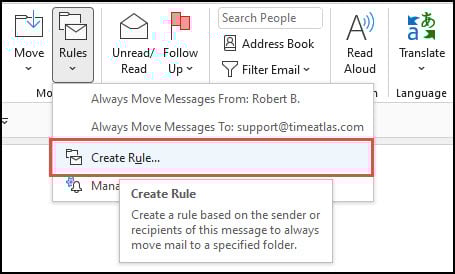
- From the drop-down list, select Create Rule…
- In the Create Rule dialog box, click Advanced Options… from the lower right corner. The Rules Wizard dialog opens with numerous check boxes. This is your blank rule state.
- Under Step 1, check “with specific words in the recipient’s address”.
- Under Step 2, click the “specific words” hyperlink.

- In the Search Text dialog box, enter the email address you wish to retire.
- Click the Add button.
- Click OK.
- Scroll down the Rules Wizard and select sender is in a specified Address Book.
- In Step 2: click the specified hyperlink.
- In the Add Address List, select the list to use.
- Click Add.

- Click Next >.
Defining the Email Actions
Now, we’ll define what we want Microsoft Outlook to do when an email is addressed to retired-email@www.timeatlas.com, AND the sender’s email is in my Contacts Address Book.
- In Step 1, check reply using a specific template.
- In Step 2, click the a specific template hyperlink.
- In the Select a Reply Template, change the Look In: value to “User Templates in File System”.
- Highlight the template you created above.
- Click Open.
- Click Next >.
- Add any exceptions (if needed).
- Click Next >.
- Type a rule description in the “Specify a name for this rule“.
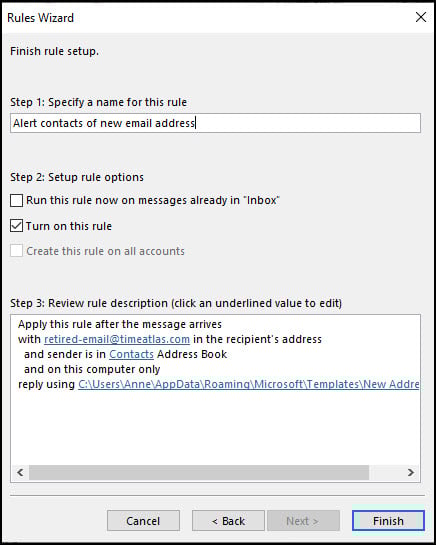
- Click Finish.
Tweaking & Testing the Outlook Rule
Although this isn’t a complex email rule, I suggest you always test them. The last thing you want is your new email address and contact info to go to everyone that sends you an email. That would make spammers happy.
An easy way to test this email rule is to use another email address such as a Gmail one. I created a test contact for myself in Outlook with the Gmail address. From my Gmail account, I sent an email to the address I used in Step 3 in the Rules Wizard. And, if you want to be extra thorough in testing, you could change the rule to use just your test address instead of any sender in your Contacts Address Book. Once you finish testing, revert back.
If the email rule works, you should see your copy of your template email in your Sent folder, provided you save copies. If you don’t see it, the rule wasn’t triggered for some reason. For example, you may have typed the wrong email address. One issue I ran into was my email rule didn’t work with delegated addresses. These are the email addresses that show “on behalf of.”
These Outlook automatic reply rules can be tweaked to suit your needs. For example, you may decide that you prefer certain Outlook groups or Outlook distribution lists to get the reminder emails instead of all contacts. Again, Microsoft provides the framework, but you can easily adjust the email rules.
Editing or Deleting Email Rules
At some point, you’ll either need to make a change to a rule or delete it. It’s also a good practice to delete mail rules you no longer need.
- From the Home menu, select Rules in the Move Group.
- From the drop-down menu, select Manage Rules & Alerts…
- In the Rules and Alerts dialog, check the item to delete.
- Click the Delete button.
- Click Yes to delete.
- Click OK.
The editing process is similar except you click Change Rule and select Edit Rule Settings. This will take you back to the Rules Wizard.
While this example showed how to automate alerting people of an address change, you could use Outlook automatic reply rules for many examples. Just take a look at your Inbox and see what type of repetitive emails you get regularly.