
Sooner or later it’s going to happen. You’ll need to send a large file to someone via email, but you’ll get an error because your attachment exceeds the limit set by your email provider. Maybe it’s a video file or a series of photos. In these scenarios, it’s good to know how easy it is to send large files for free with WeTransfer. It’s frustration-free file transfers.
Easy Process with WeTransfer
Before I begin, you could upload your files to some service like Google Drive or OneDrive. The problem I’ve encountered with that is people get flustered with shared links.
What appealed to me about the service is they get straight to the point when you arrive on their home page. No sign-up form, you’re good to go in short order. Many of the distractions have been removed.
In my case, I didn’t need the additional features the Pro plan offered. The free version would work fine since my file size was within the 2GB limitation. I also prefer starting with the free tier of a service before committing to a paid one.

Start with the Free Option
After making the selection to go with the free plan, you’re greeted with a page with few elements. As you can see, the free version is ad-supported. In this case, the ad is the entire background. There were other times when I saw interesting photographs that didn’t look like ads. The company informed me they give away 30% of the ad space to showcase editorial projects. You can see the stories “behind these wallpapers” at WePresent.
The starting point will always be to the left unless you wish to learn more about the company using the top menu.
You’ll notice that there isn’t any Sign-Up form where you need to create an account. Instead, they want you to hop over to the service agreement.

Realistically, most people will just hit the I agree button without reading the Terms of Service or Cookie Policy.
However, these guys took a nice approach and added a section to the right called “In simple speak”. You can also download the document as a PDF if you like to keep them.
info If you use Evernote, try the web clipper to capture these type of pages.
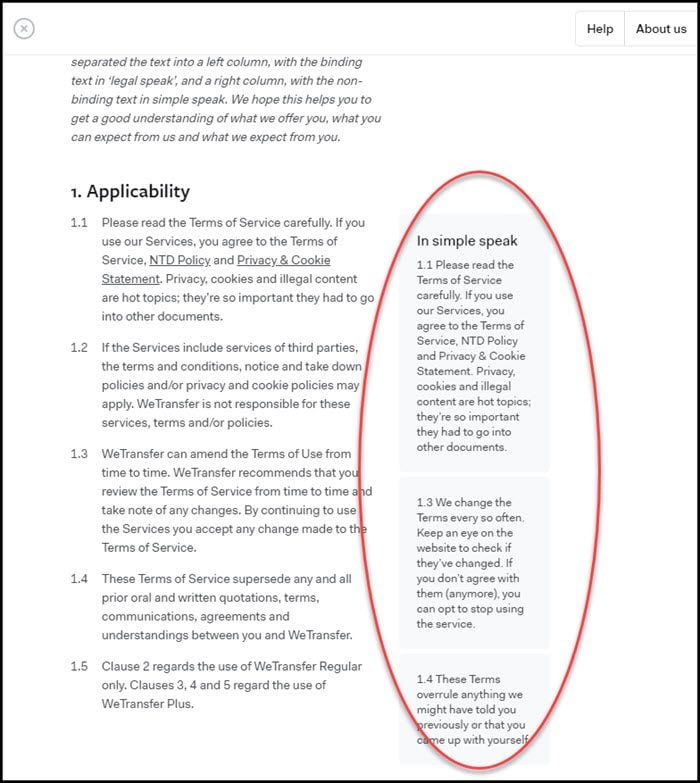
Once you get past the legal stuff, you can click the I agree button. I didn’t see anything in the agreement that concerned me.
Filling in the Form
Your page will change a bit, but again you’ll focus on the dialog on the left. The default view is to use the form and provide an Email to and Your email address. In this scenario, both you and the recipient will get emails.
info If you just wanted to share a short link, you could click the circle icon with the 3 dots next to the Transfer button. You won’t get any emails.
To get started, move your mouse up to the + Add your files button. You’ll notice that a pop-up appears to the right reminding you of the 2GB file limitation. If it helps, I previously did a tutorial on how to reduce a picture size.

After you add a file, the service calculates how much file space remains. In this instance, I used a zip file instead of loading the individual map files. Fortunately, my recipient knows how to uncompress a zip file.

Once you hit the Transfer button, the service will respond with a box indicating how long your transfer will take. Yes, I have DSL so I don’t have wicked fast upload speeds.

After the file is uploaded, you’ll see the completion message. If need be, I can send more files. I’ll also get an email notification from WeTransfer indicating the file has been sent.

What the Recipient Gets
The recipient will get an email with information about your file.

The email is straightforward although I was perplexed why there was both a button and link to get the files. The service has done a good job of showing a minimal amount of info. I was surprised to see both. (Update: The company informed me they add the download link reference for transparency reasons.)

When the recipient clicks the link, they will be taken to WeTransfer and also have to agree to the term of service. It’s a good idea when you use these services that you explain the process. This is especially true if you didn’t put your name in the form (like me) and the recipient wasn’t expecting a file from you. I’m the type of person who would discard this type of message as spam.
After they agree to the terms, they will see a dialog box similar to the one you filled out.

Service Considerations
Two things to consider before using this type of service. The first is that you make it clear to the person you’re sending the file what they should expect. Some folks may not like the idea of files being sent in this manner or being hosted on a site. Always respect their rights.
The second item is don’t use the free service with files that contain personal or private information. Although the files are sent securely, there isn’t any authentication by the recipient. They don’t have to prove who they are. What if the recipient forwarded the email or link to someone else?
As you probably saw in the earlier screen snaps, WeTransfer Pro is a service that offers additional security measures for a monthly fee.